A2P-ready websites for your GoHighLevel clients
Follow a screenshot-guided walkthrough of GoHighLevel's Trust Center, paste your chat widget code, and publish a compliant client website on its own address in minutes.
- Free — every feature included
- No credit card
- Built for GoHighLevel agencies
- Saving your widget
- Publishing your site
- Checking your site is live
- Widget detected
AUTOMATEDBOOK NOW

NON-NEGOTIABLE.Auto bodyworks built around laser-guided alignment and factory-grade refinishing.BOOK AN ESTIMATE
Built around GoHighLevel's A2P registration flow
- Trust Center walkthrough
- Low-volume guidance
- Instant subdomain
- Light and dark site styles
- Chat widget opt-in
- Privacy & terms pages
- Live verification
- Encrypted client data
From new client to live website in four steps
AutoA2P mirrors the registration you already do in GoHighLevel, and takes care of the website part for you.
Step 1: Add a client
Name the client so you can find their site later. Their website address is reserved on the spot.
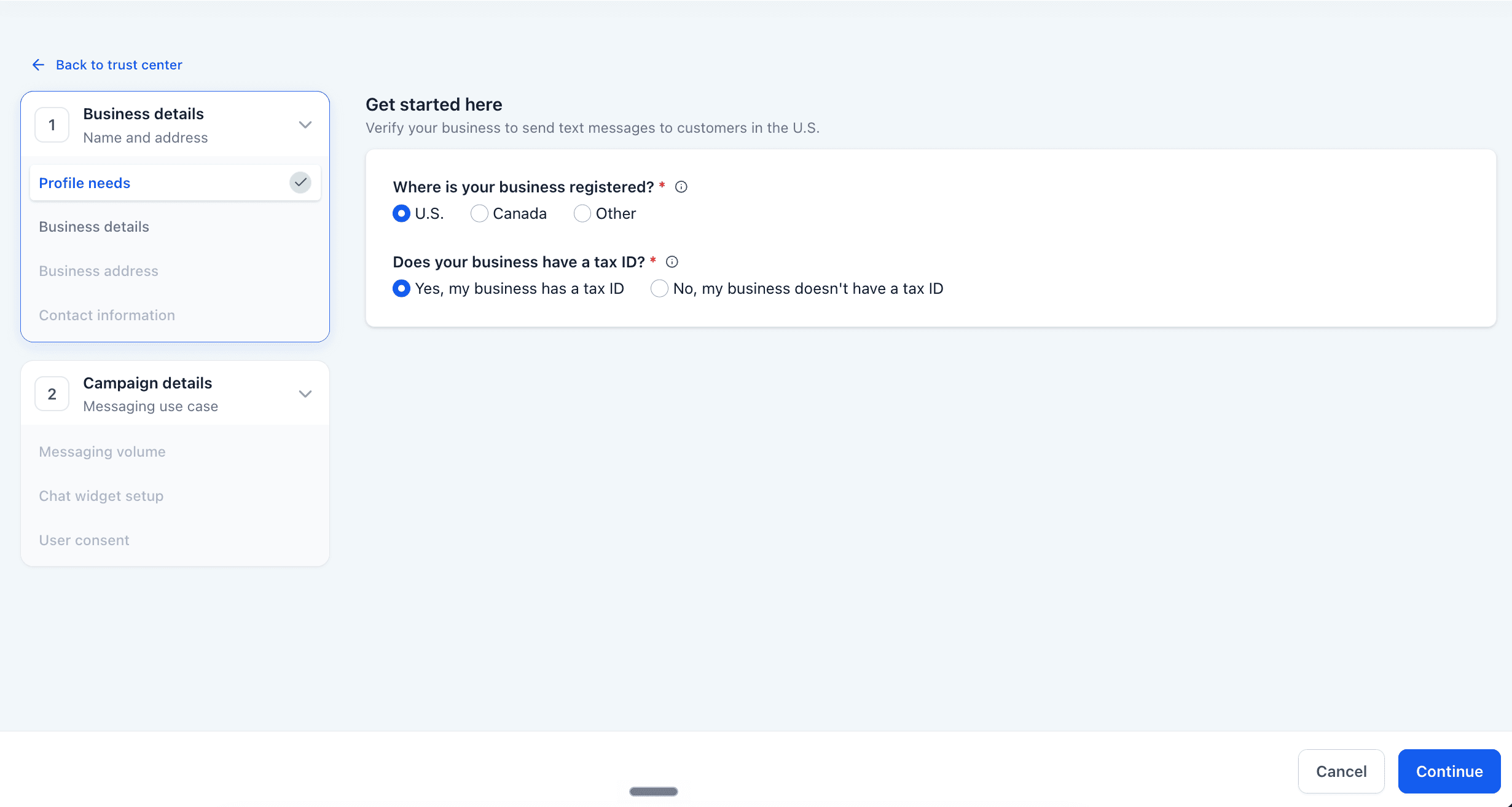
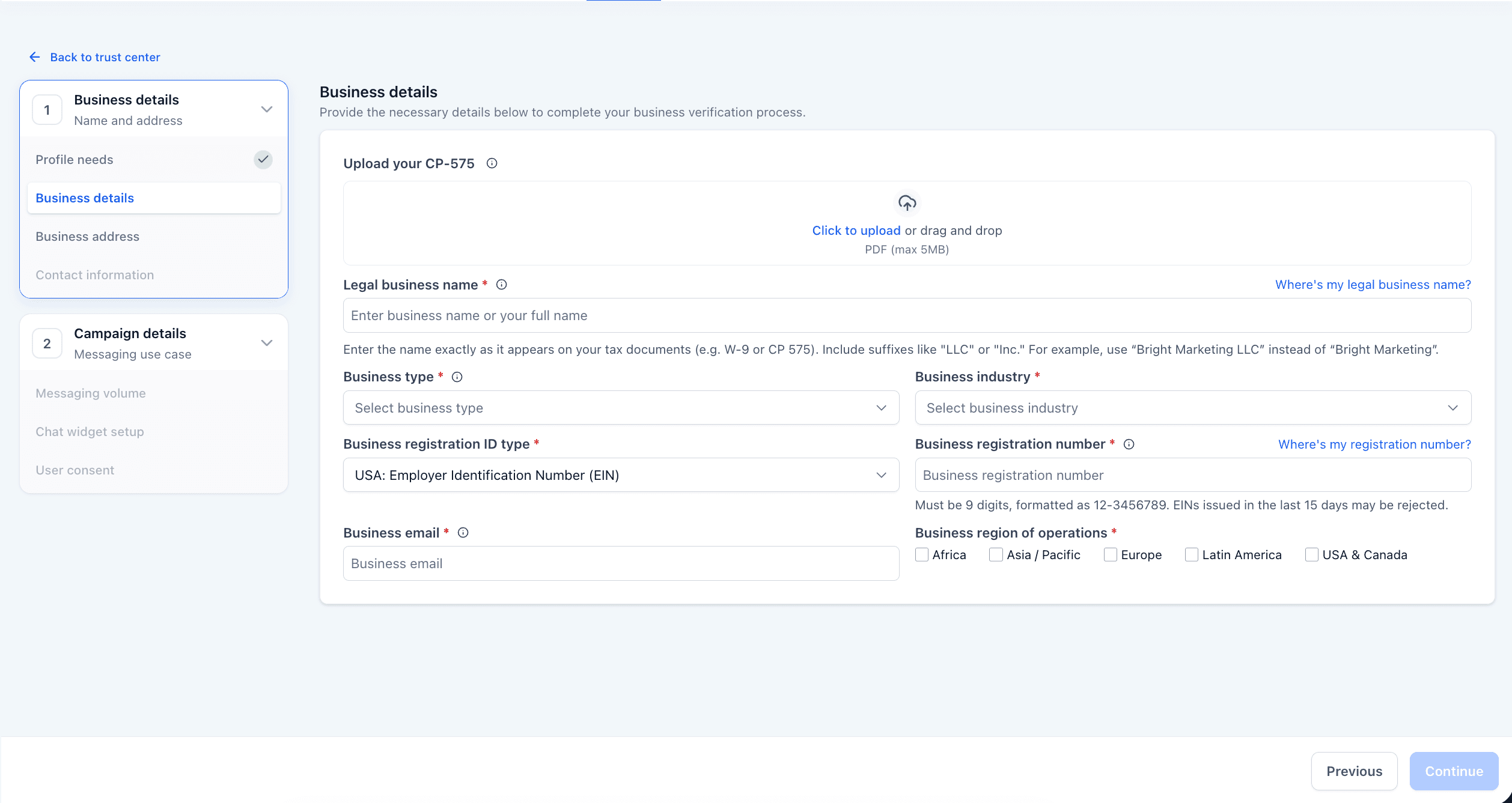
Step 2: Follow the GoHighLevel walkthrough
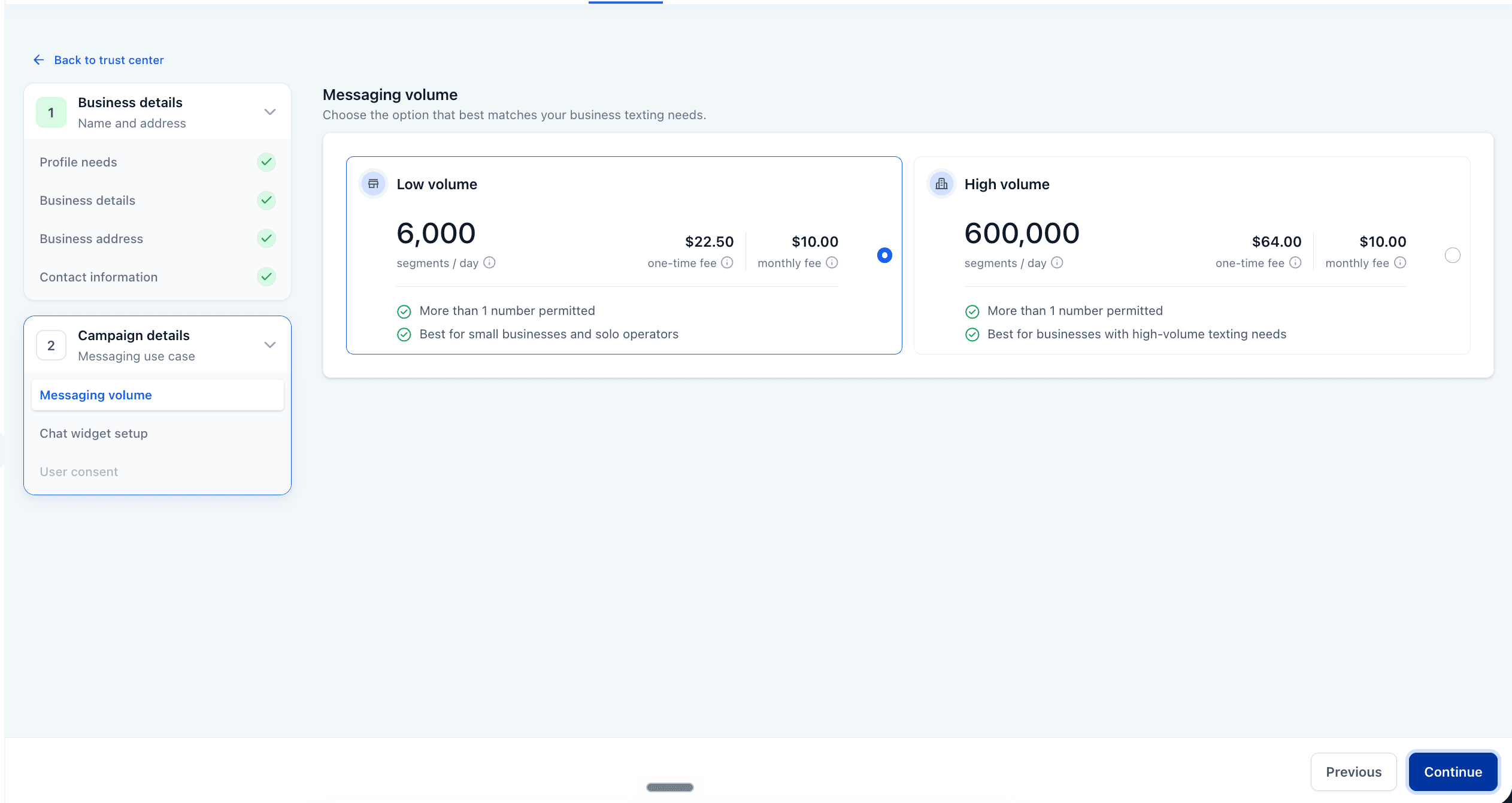
Real screenshots mirror each Trust Center screen, with the tips that matter: use your agency's info and always pick Low Volume.
Step 3: Style the site, paste the widget
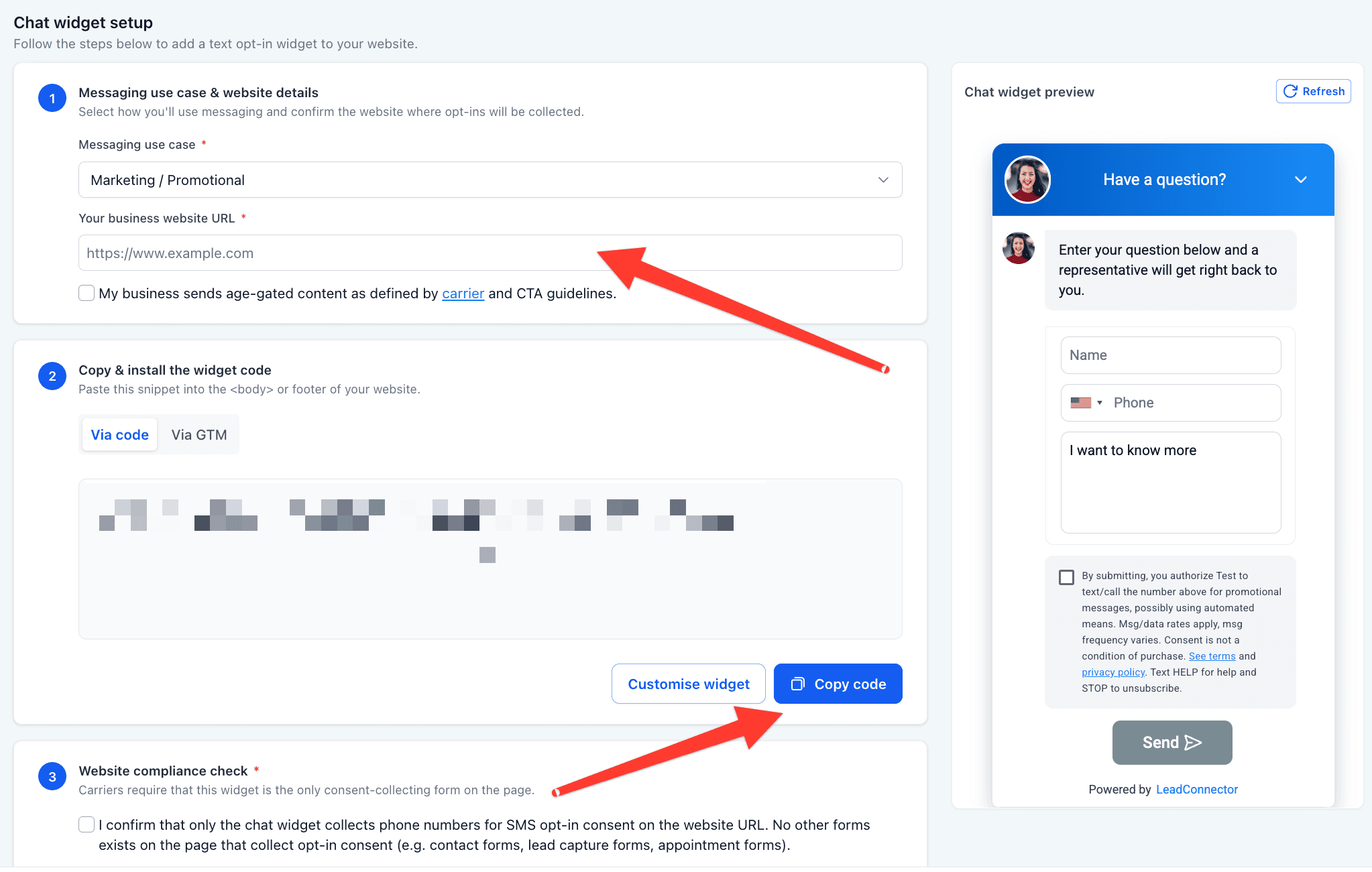
Pick a color and a light or dark look. Copy the site address into GoHighLevel, then paste its chat widget code back into AutoA2P.
Step 4: Publish and verify
Click Publish. The site goes live straight away and AutoA2P checks the live page to confirm the widget is there.
Everything the website side of A2P needs
One place to guide the registration, host the site and keep it online.
Screenshot-guided Trust Center walkthrough
Every step of GoHighLevel's A2P registration, shown with real screenshots and the tips that matter at each one.
Instant website on its own subdomain
Each client gets an address like brave-coral-river.autoa2p.com, served over HTTPS, ready to paste into GoHighLevel.
Compliant template pages
Home, about, services and contact, plus a privacy policy and terms of service, already written and linked.
Chat widget built into the page
Your LeadConnector chat widget is rendered into every page: the opt-in GoHighLevel's compliance check looks for.
Live verification after publish
AutoA2P loads the published site and confirms your widget is on it, so you know before you go back to GoHighLevel.
Seven colors, light or dark
Give each client site its own look and a ready-made business name, and preview it before you publish.
Stays live while the account is active
Sites stay online for as long as the account does. Admins invite users and can take any site offline.
Encrypted client data
Client names and integration secrets are encrypted at rest. Pasted code is never stored as-is; the widget is rebuilt from its ID.
A2P 10DLC, in plain English
If your clients text their customers from a GoHighLevel number, carriers expect that business to be registered first, and the business website is part of what gets reviewed.
Registration comes first
US carriers require businesses to register before sending texts to customers from a local 10-digit number. In GoHighLevel, that happens in the Trust Center.
The website is part of the review
The registration asks for a live business website, and reviewers typically look at who the business is, how to reach them, and its privacy policy and terms.
The chat widget is the opt-in
The LeadConnector chat widget is where a visitor can agree to receive texts, and GoHighLevel's compliance check scans the site for it.
- guided stepsFrom naming the client to publishing.
- 8
- template pagesIncluding a privacy policy and terms.
- 6
- code pasteYour chat widget, pasted once.
- 1
- lines of code to writeHosting and HTTPS are handled.
- 0
AutoA2P takes care of the website side of registration. Approval decisions are made by carriers and their review partners, so no tool can guarantee them.
Free. All of it.
Every feature, for every agency. No plans, no seats, no trial that quietly ends — you create an account and start publishing client sites.
Questions agencies ask
Straight answers about A2P, the website and getting access.
A2P (application-to-person) 10DLC is the US carrier framework for business texting from standard 10-digit local numbers. Businesses register their brand and messaging campaign before texting customers; unregistered messages can be filtered or blocked.
GoHighLevel's Trust Center registration asks for a live business website, and the review looks at that site, including how people opt in to texts. GoHighLevel's compliance check scans it for the LeadConnector chat widget, which acts as the SMS opt-in.
Not for AutoA2P: you only name the client so you can find their site later. For the GoHighLevel business details, the walkthrough recommends entering your agency's information, which is usually easier.
Low Volume. The walkthrough flags this on the messaging volume step and warns against High Volume for a new registration. You can request higher limits later.
Yes. Before you add the chat widget, you pick one of seven colors, a light or dark look and a ready-made business name, with a live preview of the site.
Immediately. The address is reserved as soon as you add a client, and the site goes live the moment you click Publish. AutoA2P then checks the live page for your widget; if it can't confirm it straight away, you can check again.
Sites stay live while your account is active. If an admin deactivates the account, its sites stop being served. Admins can also take an individual site offline.
Yes. Open a live site, choose Update widget code, paste the new code and publish again. The site keeps the same address.
Yes. API access is available through inquiry for agencies that want to create and manage websites from their own software. Contact us to discuss access and usage limits.
Nothing. Every feature is included for every account: unlimited client sites, the walkthrough, hosting, HTTPS and verification. There is no plan to pick and no card to add.
Sign up. Signups are open, so you create your account, verify nothing and start your first site straight away — no invite, no sales call, no card.
Stop building compliance sites by hand
Guide the registration, publish the website, confirm the widget, and move on to the next client.
Free to use. No invite needed.